
By Nigel Douglas
By now a bunch of people in the OpenSSF community might already be aware of the Malicious Packages repository, but are you using it as part of your day-to-day software supply chain security?
The OpenSSF Malicious Packages repo is the first open source system for collecting and publishing cross-ecosystem reports of malicious packages – such as dependency and manifest confusion attacks, typosquatting, offensive security tooling, protestware and more.
In the past months we have seen a rise in targeted attacks on open source upstream registries like npm and PyPI – most notably Axios and LiteLLM. These compromised, misleading or outright malicious open source software packages are the focus for this project. A centralised source-of-truth repository for shared intelligence helps the open source community understand the complete range of threats, but ultimately to prevent developers consuming software dependencies that are essentially just backdoors in your codebase.
The reports in the Malicious Packages repo use the Open Source Vulnerability (OSV) format. OSV was, as the name suggests, originally created for classifying open source software packages in JSON-formatted output for known vulnerabilities, fix availability and other security advisory information. By using the OSV format for malicious packages it is possible to make use of existing integrations, including the OSV.dev API, the osv-scanner tool, deps.dev, and build your own tools on top of these open source data sources.
Getting up and running with the API
A good place to start is understanding how malicious packages or malware is classified in OSV. Similar to how vulnerabilities start with “CVE-” (ie: CVE-2025-3248), malicious packages start with “MAL-” (ie: MAL-2025-6812). You can simply curl the existing vulns endpoint for api.osv.dev, but instead of using a CVE ID, use the Malicious Packages ID.
curl -s "https://api.osv.dev/v1/vulns/MAL-2025-6812" | jq .
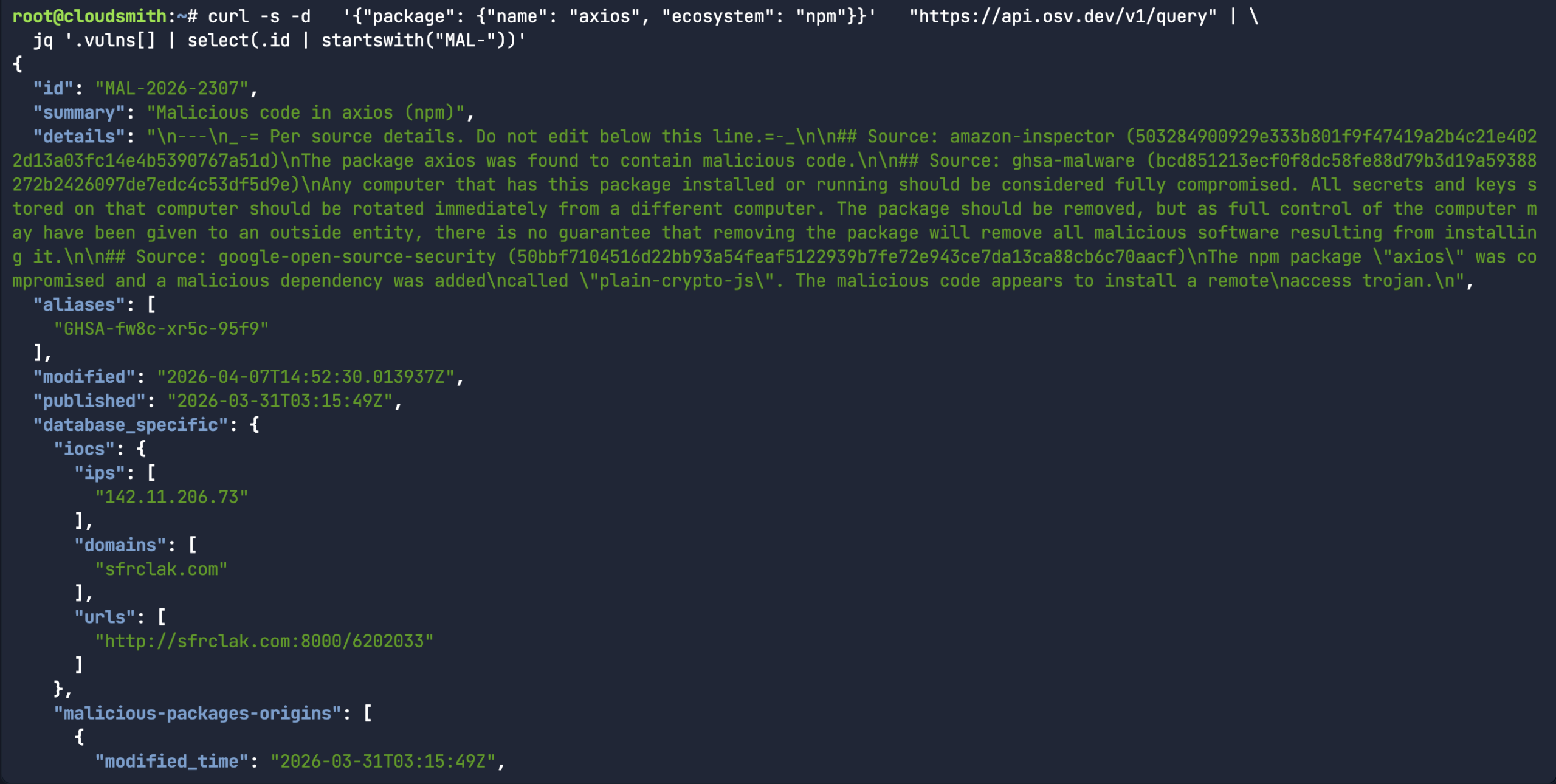
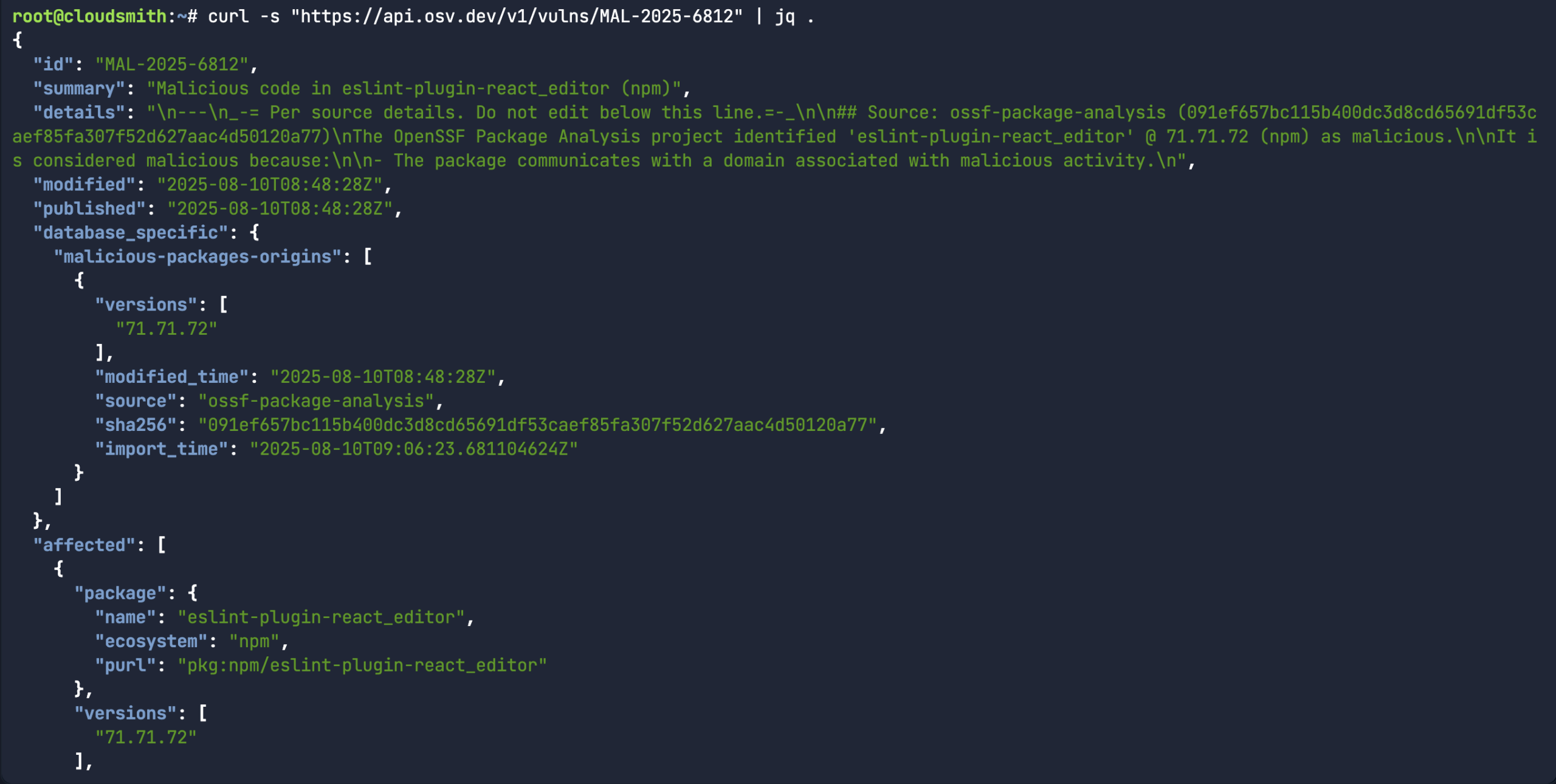 While the above command does return a bunch of information about a specific malicious package record, it would assume you already knew what the malicious package ID was in the first place. A more common use-case for the API is to look for a specific package name/version and the associated open source upstream source (ie: npm) to see if there’s a malicious package record associated with it.
curl -s -d   '{"package": {"name": "axios", "ecosystem": "npm"}}'   "https://api.osv.dev/v1/query" | \

  jq '.vulns[] | select(.id | startswith("MAL-"))'
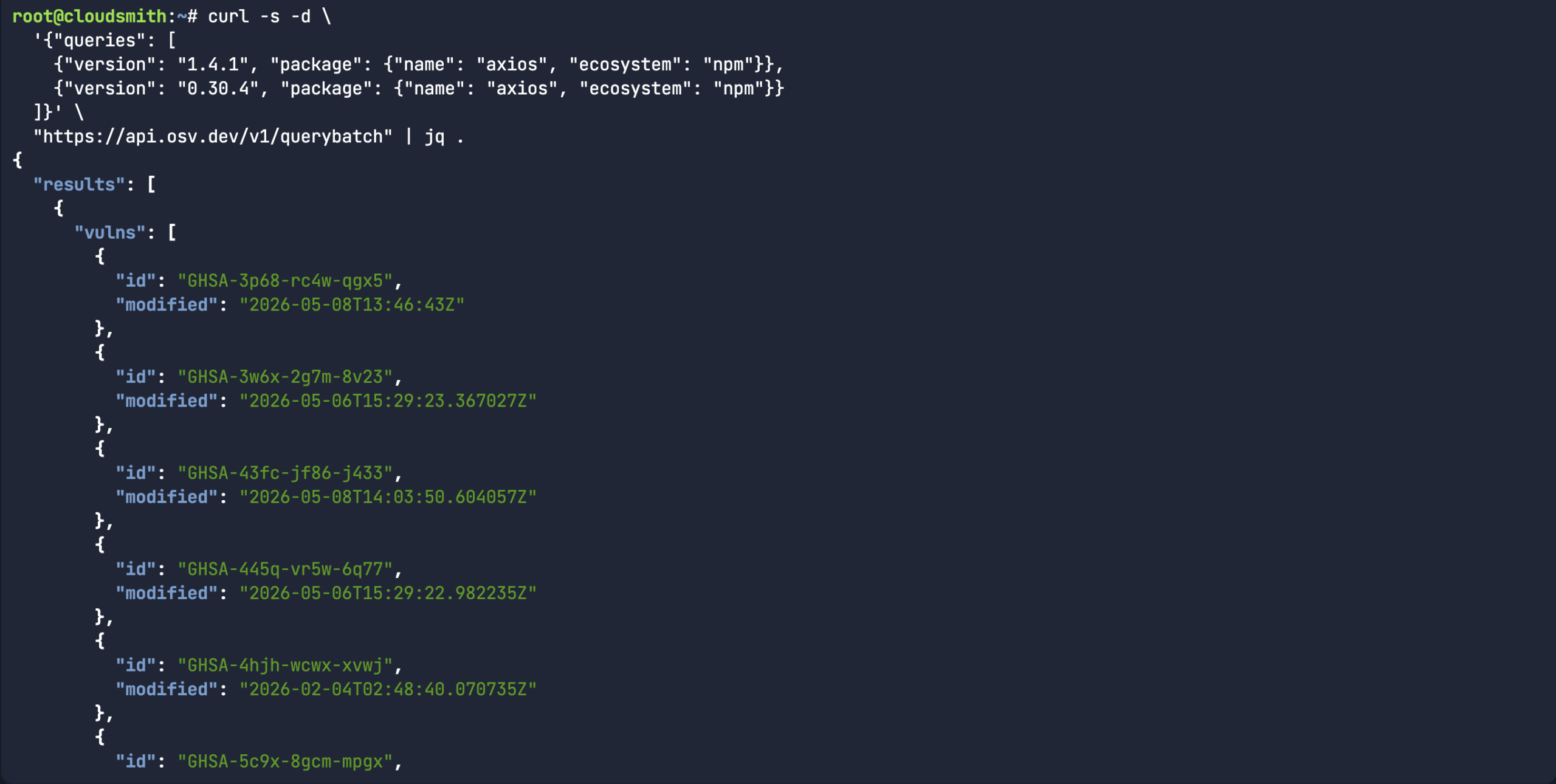
 Or in the case of the Axios compromise, there were two different affected versions. Rather than scanning each version separately, you can use the querbybatch endpoint to handle multiple packages, versions and even ecosystems. In the case of MAL-2026-2307, both package versions carry the same malicious package ID.
curl -s -d \

  '{"queries": [

    {"version": "1.4.1", "package": {"name": "axios", "ecosystem": "npm"}},

    {"version": "0.30.4", "package": {"name": "axios", "ecosystem": "npm"}}

  ]}' \

  "https://api.osv.dev/v1/querybatch" | jq .
Building a custom Kubernetes Scanner
I came up with a simple osv-kubernetes.py scanner. The thought process here is that I could create a simple python-based Kubernetes deployment manifest. This pod has a list of Python packages in the filesystem of the pod, as seen when I run the pip list command.
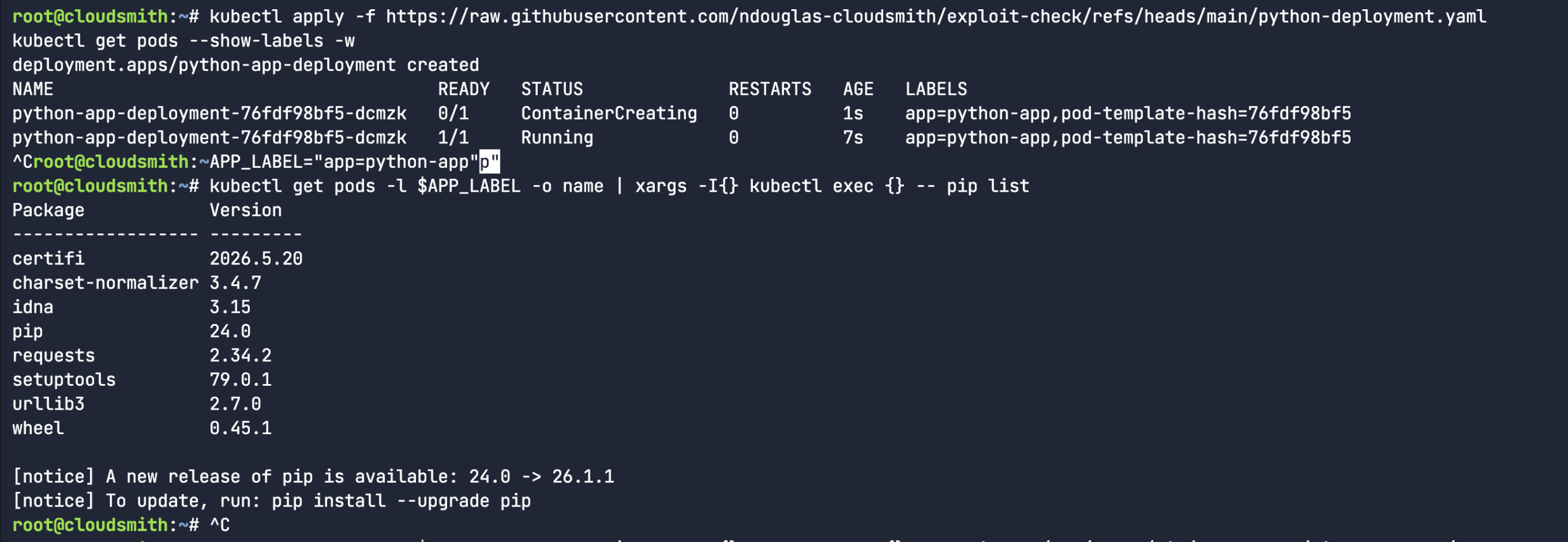 So, I proceeded to create a fake python library (rather than downloading an actual malicious software package). I mean, the package name and version were real, but I fabricated the entire content of the package. It’s a totally dummy package – as you can see from the below echo commands. Let’s see if our custom osv-kubernetes scanner script will pick it up.
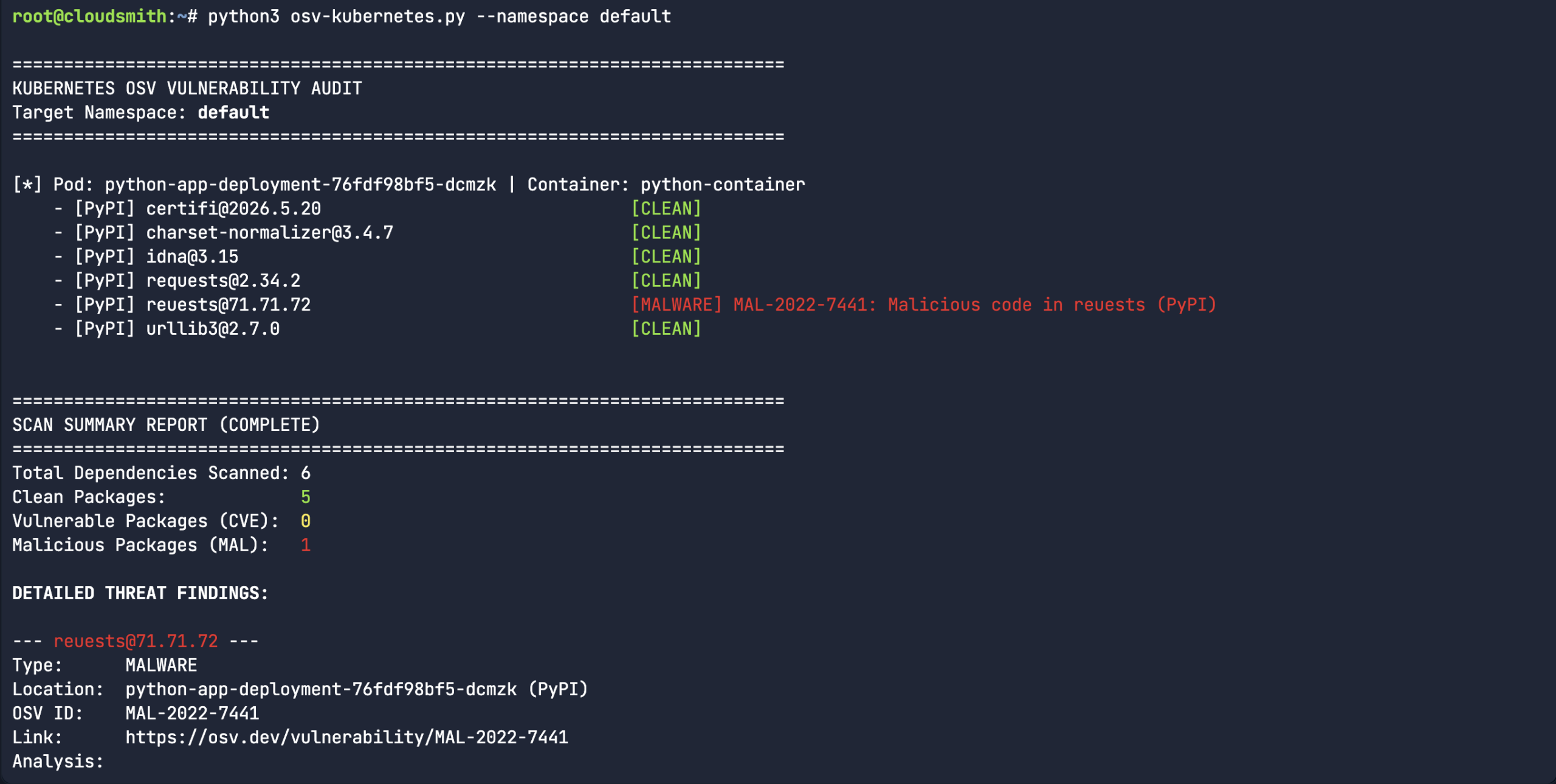 So, we created a fake typosquatted Python package. “Reuests” instead of the legitimate “Requests” library. All versions of the typosquatted Reuests library are tracked under MAL-2022-7441. While this is a simple experiment, it takes us beyond the manual process of scanning each library name and version, and automates it by piping the output of the pip list command into the API query. There are many ways that users can use the OSV API, this was purely an experiment for Kubernetes workloads.
Use OSV-Scanner
While there are certainly use-cases for building your own custom scanners, like what we did with the Kubernetes pod scanner earlier, I would recommend using the official OSV-Scanner to find existing vulnerabilities and malicious code injection affecting your project’s dependencies. OSV-Scanner provides the officially supported frontend to the OSV database and CLI interface to OSV-Scalibr that connects a project’s list of dependencies with the vulnerabilities that affect them.
In the below scenario, I used syft to create a simple Software Bill of Materials (SBOM) in JSON output based on an existing Python requirements.txt file. As we found out earlier, the OSV API is entirely JSON-structured, so we wouldn’t scan unstructured .txt files. The most common file to scan would be the SBOM or lock files (ie: osv-scanner –lockfile=package-lock.json).
syft packages requirements.txt -o cyclonedx-json=sbom.cdx.json
osv-scanner -L sbom.cdx.json
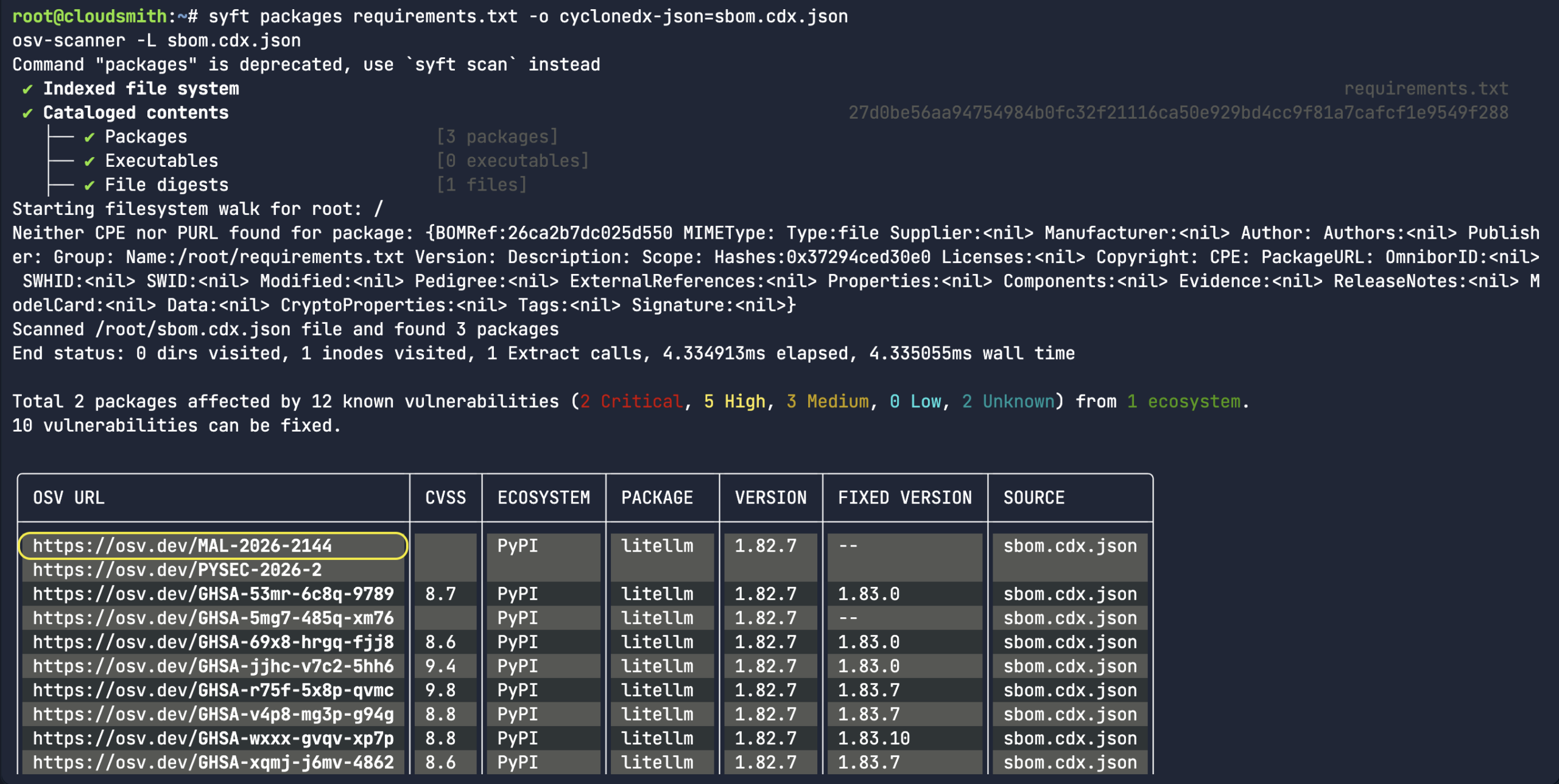
As you can see from the screenshot, the CycloneDX SBOM is successfully sourced. The packages LiteLLM and requests were correctly identified as being from the PyPI ecosystem since the Python requirement.txt file was converted into SBOM. As well as having multiple security advisories related to an upstream compromise, LiteLLM was corrected marked as malicious – MAL-2026-2144.
Again, this process is good and all, but you really need to integrate it into the CI/CD process. The OSV-Scanner Github Action leverages the malicious packages repository and the OSV-Scanner CLI tool to track and notify you of known malicious packages across the existing languages and ecosystems. The most common workflow for Github triggers a scan with each pull request and will only report new instances of malware introduced through the PR. The Github Action compares a scan of the target branch to a scan of the feature branch, and will fail if there are new vulnerabilities or malicious packages introduced through the feature branch. Alternatively, this process can be achieved on Scheduled Scans using a cron job.
Moving towards best practices
I say this a lot, but in light of the recent axios@1.14.1 compromise, please make sure you always commit your npm project with the package-lock.json file. It is the only version-locking enforcement mechanism that exists in npm today. Developers should be using npm ci instead of blindly using npm install on Javascript libraries sourced from npm. The npm ci command will only work if a package-lock.json file exists. These lockfiles can also be easily scanned, as seen with osv-scanner.
Likewise, if you need to update or pull new packages from open source registries like npmjs.com, it’s also worth using the –min-release-age flag (available since npm v11.10.0) to make sure you only install updates, which are at least 3 days old (ie: npm install –min-release-age=3). Most open source malicious packages end up getting classified by OSV.dev within the first 3 days, so configuring a cooldown period is perfect to help prevent consumption of unknown or new variants of malware campaigns.
You can literally hardcode this setting (min-release-age=7) into your .npmrc file. There will always be more malicious actors attacking popular npm and PyPI packages in the future. Thankfully, most will get caught in the first 24 hours, in part due to the fantastic work going on within the OpenSSF Malicious Package packages project. I’m not trying to say that the Javascript (npm) and Python (PyPI) ecosystems are broken by design, but we certainly cannot apply blind trust to the software supply chain.
Get Involved: Help Us Secure the Ecosystem
The strength of the OSV project lies in its community. You can help protect the open source landscape by:
- Reporting Threats: If you encounter a malicious package, report it to the OpenSSF Malicious Packages repository.
- Contributing: Help us improve the database by contributing to the OSV project or integrating the API into your own security tooling.
About the Author
 Nigel Douglas is the Head of Developer Relations at Cloudsmith. He champions Cloudsmith’s developer ecosystem by creating compelling educational content, engaging with developer communities, and promoting software supply chain security best practices. Nigel helps build and shape the DevOps community through events, tutorials, and innovative programs.